All examples

Behind the scenes

How this module was made

“No one was hurt: should it still be reported?” was built on 23 September 2026 from a two-page safety procedure. Here is every step: what the AI produced, what the expert decided, and what they had to correct.

See it among the examples
Download the original procedure

Word, 2 pages, in French. A fictitious procedure written for this demonstration.

of processing by the tool, measured step by step
< 30 min
of processing by the tool, measured step by step
of AI processing, in French and English, images and voice-over included
$1.86
of AI processing, in French and English, images and voice-over included
corrections made by the expert before publishing
15
corrections made by the expert before publishing

What goes in

A single document: procedure HSE-04, as a safety department would write it. A definition, who reports and how quickly, the no-blame principle, what happens after a report, and three settled cases. The ideal document: it sets rules and it gives cases.

Three choices the expert made at import

  1. The audience: “any employee, temporary worker or contractor on an industrial site, with no prior safety knowledge”. The AI takes its tone, examples and question level from it.
  2. “Provided content” mode: the AI may only use this document, nothing it knows from elsewhere.
  3. A link rather than a file: the document is a shared Google Doc, which the tool re-reads every night.

The steps, one by one

The AI’s durations are measured. The expert’s are not yet: we will publish them once we have timed a real expert.

  1. 1. Import the document and describe the audience

    Expert

    Paste the document’s link, describe in one sentence who the module is for, choose “Provided content” mode.

  2. 2. Draw up the plan

    AI · 48 s

    The AI proposes 5 objectives and 14 slides. The expert validates the objectives, their level (know, apply, decide) and their importance, before anything is written.

  3. 3. Write the slides

    AI · 2 min 40 s

    One slide at a time, from the plan’s notes: the content, a branching scenario, a true-or-false game and the final assessment.

  4. 4. AI review

    AI · ≈ 5 min

    Two automatic review passes, 11 remarks: a grammar slip, an inconsistent scenario, a quiz answer with no explanation… The fixes are applied in one click.

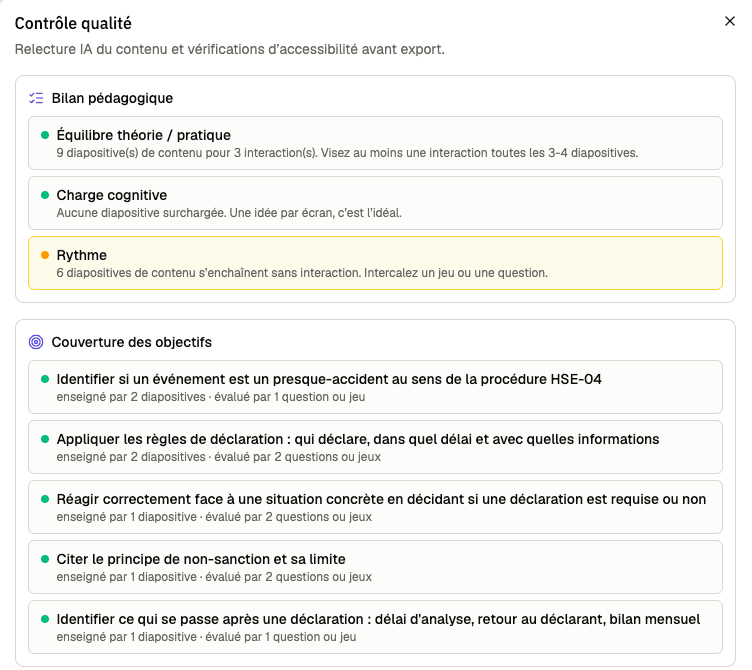
    The quality check, in French: teaching balance (theory and practice, cognitive load, pace) and how each of the 5 objectives is covered by slides and questions.
    The quality check counts what the eye does not: here, six content slides in a row with no interaction.
  5. 5. Expert review, with the document at hand

    Expert

    The step that matters. The expert reads every slide against the procedure: 8 slides corrected, one game moved earlier to pace the module better. No teaching skills required: all it takes is knowing whether a sentence is true.

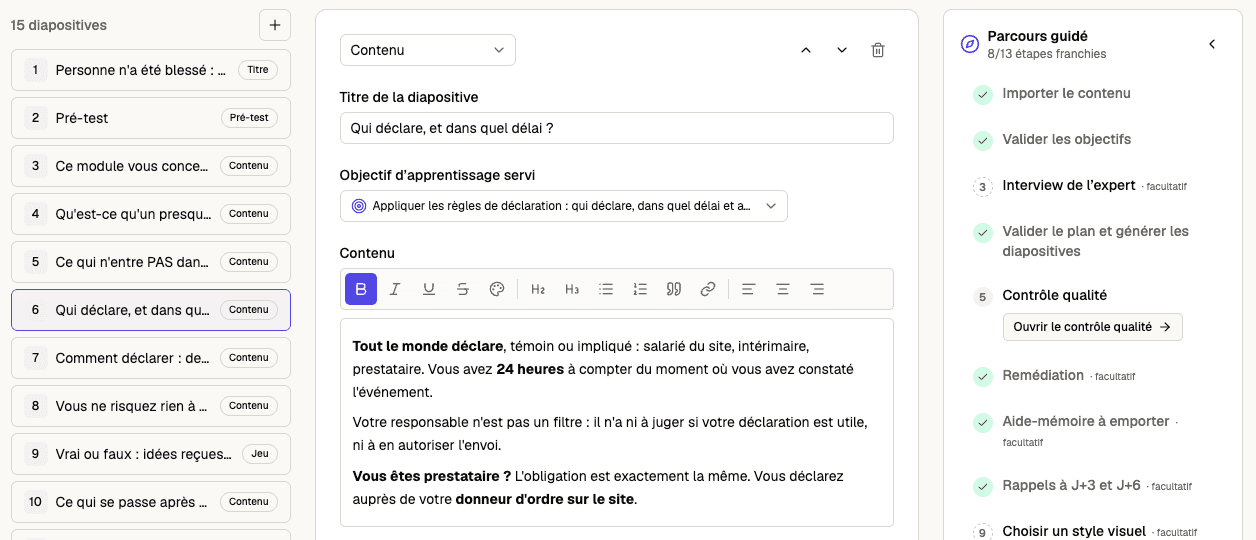
    The Fontivia editor, in French: on the left the list of 15 slides, in the centre the slide “Who reports, and how quickly?” being reviewed, on the right the guided path with its completed steps.
    The review screen: the expert edits the text directly, and each slide shows the objective it serves.
  6. 6. Pre-test, re-explanations, worked examples

    AI · 2 min 30 s

    For a path that adapts to each learner: 13 pre-test questions, and one re-explanation and one worked example per objective. The expert corrects 2 examples and 2 questions.

  7. 7. Memo sheet

    AI · 30 s

    A one-page takeaway, in French and English. Nothing to correct.

  8. 8. 30-day reminders

    AI · ≈ 4 min

    Four reminder sessions, emailed to learners who opt in. The expert has one session redone, because two of its questions contradicted the procedure.

  9. 9. Images, translation, voice-over

    AI · < 15 min

    12 narration scripts, 2 images, 14 slides translated into English and 28 voice-overs, launched in one go. The expert chooses the visual style and the voice.

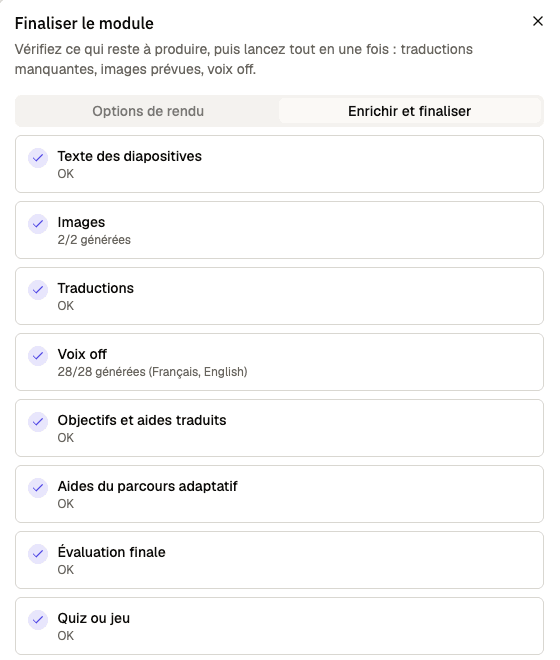
    The finalization checklist, in French, every line ticked: text, images 2 of 2, translations, voice-over 28 of 28, translated objectives, adaptive-path aids, final assessment, game and certificate.
    Before delivering, a single list says what is still missing.
  10. 10. Validate and deliver

    Expert

    The expert validates the module in their own name: the “Content validated by” mention travels with the module all the way to the learner. They then export it to the company LMS (SCORM), or share it with a simple link.

What the expert corrected

Three real examples out of the 15 corrections. None was a language error: each said the opposite of the procedure, as confidently as everything else.

Who does a contractor report to?

Proposed by the AI

“You pass the information on to your site foreman or to your company’s manager on site.”

After the expert

“You report to your client on the site.”

The procedure says the opposite. And this particular error was introduced by the automatic correction itself.

An out-of-calibration torque wrench

Proposed by the AI

“The procedure applies to non-compliant equipment, regardless of any exposure. I report it.”

After the expert

“No one was exposed: it is not a near miss. I submit a maintenance request.”

This is one of the three cases the procedure settles, exactly the other way round.

A question whose answer was debatable

Proposed by the AI

An oil leak behind barriers no one could cross, with “report it” as the only right answer.

After the expert

An oil leak in an aisle used by the teams: the right answer is no longer up for debate.

An ambiguous question skews the pre-test, and so what the module decides to show each learner.

The tool proposes, the expert decides. That is why the mention the learner reads carries a person’s name, never a model’s.

The questions we get asked

How much of the expert’s time does it take?

For this module, under half an hour of processing, measured. For the expert, allow one to two hours of attention for a first module, mostly reviewing. That is an estimate: we will publish a timed figure as soon as an expert has measured it.

What is left for the expert to do?

Bring the document and say who the module is for. Validate the objectives. Read every slide against the document. Decide when their documents contradict each other. Validate the module in their own name, then choose how to deliver it. An optional interview also lets them add what is written nowhere: common mistakes, misconceptions from the field. We skipped it here, as the procedure already contained its cases.

Are any particular skills needed?

Knowing the subject well enough to tell whether a sentence is true, and whether a question has only one right answer. No teaching training, no technical skills: the objectives, pre-test, pacing and export are proposed by the tool.

What documents need to be provided?

Word (.docx), PowerPoint (.pptx), PDF, Excel (.xlsx, .xls, .csv) or text (.txt, .md), up to 25 MB per file. Or a link to a page or shared document readable without signing in: that is what the tool re-checks every night. The best documents set rules and give cases: procedures, work instructions, guidelines, existing training material. A purely descriptive document makes a weaker module.

What does the AI get wrong, and how do you notice?

It decides silently: faced with a rule, it sometimes writes the opposite, without hesitation. “Provided content” mode stops it from inventing from what it knows elsewhere, and the automatic review catches some errors, not all. Hence the expert’s review, and the three examples above.

How much does it cost to make?

$1.86 of AI processing for this module, in two languages, images and voice-over included. Each module’s cost is shown to its author, to the cent.

What happens when the document changes?

A document added by link is re-read every night. If it has changed, the author gets an email, sees what changed and which slides depend on it, and the tool proposes a correction for each one. Nothing is changed without them.

Where do my documents go?

Documents and modules are stored in the European Union. The text required is processed by our subcontractors’ AI models, listed in our privacy policy.

Read the privacy policy
How does the module reach learners?

Through a SCORM export to upload to the company LMS, or through an online portal opened with a simple link, with no account needed for the learner.

Can several people review?

Yes. The author invites collaborators: an editor can change the module, a reviewer can comment on it and validate it without changing it.

What if my documents contradict each other, or there are forty of them?

The tool spots passages that cannot both be true and asks the author instead of deciding. For a large body of documents, a document folder proposes splitting it into several modules, and the author decides how.

Your turn

Bring a procedure you have already written: the tool turns it into a module you review and validate.

Create my first module